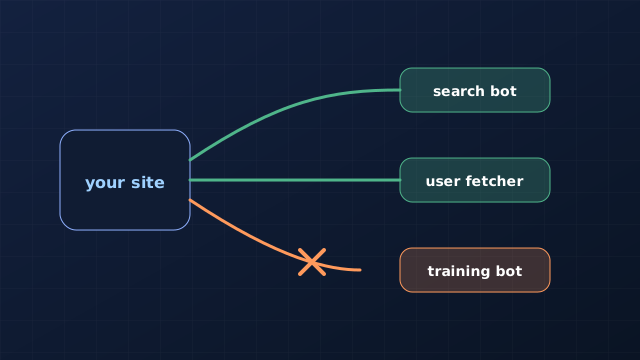
AI crawlers fall into three groups: search bots that let AI tools find and link your pages, training bots that collect content for future models, and fetchers that visit a page when a person asks about it. You can allow search while declining training. Blocking a search bot by mistake can remove you from AI answers, so decide by purpose, not by the word "AI".
What each AI bot does, by vendor
Each vendor publishes its own list and describes its bots slightly differently. The table below summarises their documentation as we read it on 3 November 2026; check the linked pages before you change a live file, because these lists change.
| Vendor | Bot | Purpose | What blocking it does |
|---|---|---|---|
| OpenAI | OAI-SearchBot | Surfaces sites in ChatGPT search features | Your site won't appear in ChatGPT search answers, though it can still appear as a plain navigational link |
| OpenAI | GPTBot | Collects content that may train OpenAI's models | Signals your content shouldn't be used for training |
| OpenAI | ChatGPT-User | Visits pages when a user asks ChatGPT or a custom GPT | OpenAI says robots.txt rules may not apply, because a person triggered the visit |
| Anthropic | Claude-SearchBot | Improves the quality of Claude's search results | Blocks indexing for search, which may reduce your visibility in Claude's search results |
| Anthropic | ClaudeBot | Collects content that could contribute to model training | Future material is excluded from training data |
| Anthropic | Claude-User | Fetches pages when someone asks Claude a question | Prevents retrieval for those questions, which may reduce your visibility |
| Perplexity | PerplexityBot | Surfaces and links sites in Perplexity search; Perplexity says it is not used to crawl for foundation-model training | Your site may not appear in Perplexity results |
| Perplexity | Perplexity-User | Visits a page when a user's question needs it | Perplexity says it generally ignores robots.txt, because a user requested the visit |
| Google-Extended | A robots.txt token, not a separate crawler, for Gemini training and grounding | Google says it has no effect on Search inclusion or ranking |
Two points matter most. First, OpenAI says its bots page recommends allowing OAI-SearchBot if you want to appear in ChatGPT search, and separates that from GPTBot, which is about training. Second, Google says Google-Extended "does not impact a site's inclusion in Google Search" and is not a ranking signal, so blocking it is a training and grounding decision, not an SEO one.
Where Google's AI features fit
Google's AI Overviews and AI Mode don't have a separate crawler to allow. Google says a page can appear as a supporting link if it is indexed and eligible to be shown in Google Search with a snippet, with no additional requirements. In practice, the Googlebot access you already give for ordinary Search is what counts, so blocking Googlebot would be the way to lose AI Overview eligibility, and blocking Google-Extended would not. The snippet and indexing controls that do limit these features are covered in Google AI Overviews and AI Mode: how to control them and report on them.
- Allowing search bots is how you stay visible when people ask AI tools about your category.
- Declining training bots is a policy choice about your content. It is separate from visibility.
- Blocking everything with "AI" in the name risks hiding you from the tools your customers use.
A sensible starting robots.txt
We recommend starting from what you want to be true: most small businesses want to be found in AI answers, and decide separately about training. The file below is an illustrative example of that choice, not a universal answer. If you prefer to allow training, delete the two training blocks.
# Search and user-requested bots: allowed
User-agent: OAI-SearchBot
Allow: /

User-agent: Claude-SearchBot
Allow: /

User-agent: PerplexityBot
Allow: /

# Training bots: declined (a policy choice, not an SEO one)
User-agent: GPTBot
Disallow: /

User-agent: ClaudeBot
Disallow: /

# Everyone else, including Googlebot
User-agent: *
Disallow: /admin/

Sitemap: https://www.example.com/sitemap.xmlexample.com and the private paths with your own. Put the file at the root of each subdomain you want it to cover.Keep three limits in mind. robots.txt is a request that well-behaved bots follow, not a lock, so don't rely on it to protect private pages; use authentication. User-requested fetchers may not follow it at all, as the vendors say above. And a security tool, CDN or firewall that blocks unfamiliar bots can undo a permissive robots.txt: Anthropic also warns that blocking its IP addresses can stop its bots reading your robots.txt and may not work reliably.
Check that it works
- Open
yoursite.com/robots.txtin a browser. It should load as plain text, not redirect or error. - Check each subdomain (for example
app.orblog.) has its own file where it needs one. - Confirm that a firewall, CDN bot rule or "AI scraper" setting isn't blocking the search bots you allowed.
- Wait. OpenAI says it can take about 24 hours for its systems to adjust after a robots.txt change, and Perplexity says up to 24 hours.
- Re-check in a month: bot names and policies change.
What to do next
If you haven't audited crawl access properly yet, start with the technical SEO audit checklist, which puts crawling and indexing first. To see how access connects to being named and linked in AI answers, read mentions, citations and recommendations in AI answers and the framework guide on SEO vs AEO vs GEO.
Once the right bots can reach you, the content decides whether you are used: how to get cited in AI answers is the page-level checklist, and how to run an AI visibility audit shows how to measure the result.
Next action: open your live robots.txt today and write down, for each AI bot above, whether it is allowed or blocked and why. If you can't say why, that is the thing to fix.
Sources and methodology
- OpenAI: Overview of OpenAI crawlers, for OAI-SearchBot, GPTBot and ChatGPT-User and the 24-hour adjustment time.
- Anthropic: Does Anthropic crawl data from the web, and how can site owners block the crawler?, for ClaudeBot, Claude-User, Claude-SearchBot and the IP-blocking warning.
- Perplexity: Crawlers, for PerplexityBot and Perplexity-User.
- Google Search Central: Google's common crawlers, for Google-Extended.
- Google Search Central: AI features and your website, for AI Overviews and AI Mode eligibility.
Methodology. This guide is based on the vendor documentation above, read on 3 November 2026. We did not test how each bot behaves in practice, and vendors can change their bots and policies without notice. The robots.txt file is an illustrative example and the recommendations marked "we recommend" are our opinion.
Reviewed .