An AI visibility audit asks the same fixed set of real customer questions on each AI assistant, records every answer in full, and counts how often your business is named and how often your pages are linked. Report each rate with its sampling range, because AI answers change from run to run and a handful of answers can mislead. Do not report position or a single blended score.
What to measure in an AI visibility audit, and what to leave out
Four measurements cover what a business can act on. They build on the three signals separated in mentions, citations and recommendations in AI answers: here the aim is to count them reliably.
| Measurement | How to calculate it | Question it answers | Watch out for |
|---|---|---|---|
| Mention rate | Answers that name the business ÷ completed answers | Does the assistant know and surface us? | Name variants and look-alike businesses. Confirm each match |
| Citation rate | Answers that link to a page of your site ÷ completed answers | Is one of our pages used as a source? | A domain written in plain text is not a link |
| Question coverage | Questions where you were named at least once ÷ questions asked | For how many customer needs do we appear at all? | A question asked once is weak evidence either way |
| Share of voice | Answers naming you ÷ answers naming you or a tracked competitor | Against the competitors we chose, how often do we appear? | It is not market share. It depends on which competitors you track |
Two things are better left out. The first is position in the answer. SparkToro and Gumshoe ran 12 prompts about 3,000 times across ChatGPT, Claude and Google's AI, and Search Engine Journal's report of the study says identical brand lists almost never repeated, while how often a brand appeared was a steadier measure than where it was listed. The second is a single blended score: it hides which of the four measurements is weak, so you cannot tell what to fix.
- Pick the four measurements above and report each separately, with its range.
- If someone sells you an "AI rank" or one visibility score, ask how it is calculated and how many answers sit behind it.
- Share of voice only means something against competitors you named in advance.
Step 1: Write a fixed question set
The question set is the instrument. If it changes, a change in the results can no longer be trusted. Write it once, date it, and only add questions as a new version.
- Use customers' words. Take them from sales calls, support emails, reviews and the queries in Search Console, not from your own marketing language.
- Cover four kinds of question so the audit reflects the buying journey: discovery ("best…"), comparison ("X vs Y"), problem-solving ("how do I…") and brand-specific ("is X any good").
- Include service and place where they matter, because local answers differ by location.
- Start with 10 to 20 questions. Fewer than that leaves coverage meaningless. More is only useful if you can run all of them often enough to build up answers.
| Type | Example question |
|---|---|
| Discovery | Who is the best emergency plumber in Leeds? |
| Comparison | Is a call-out plumber or a heating engineer better for a leaking boiler? |
| Problem-solving | How much does an emergency boiler repair cost in Leeds? |
| Brand-specific | Is Example Plumbing a reliable company? |
Step 2: Run the questions and record every answer
Ask every question on every assistant your customers use, then repeat on a schedule. Store the full answer text, not a summary, so a disputed match can be re-read later. Each observation needs these fields:
| Field | Why it matters |
|---|---|
| Date and time | Answers drift, so trends need dates |
| Assistant and model version | A model update can change results overnight, and you need to see it |
| Web search on or off | Answers that search the web behave differently from answers from model memory |
| Location and language | Local questions give local answers |
| Exact question and question-set version | Keeps the instrument fixed |
| Full answer text | The evidence behind every count |
| Named? Linked? Which URL? Which competitors? | The inputs to the four measurements |
| Run status | Refused or failed runs are excluded from the denominator, and never counted as "not named" |
Checks through an assistant's official API are repeatable and can be scheduled. Chat screens may differ from the API, because of personalisation and features the API does not expose, so record which you used and don't mix them in one rate. Before you start, make sure the search crawlers behind each assistant can reach your site: see AI crawlers and robots.txt.
Step 3: Count the answers and show the range
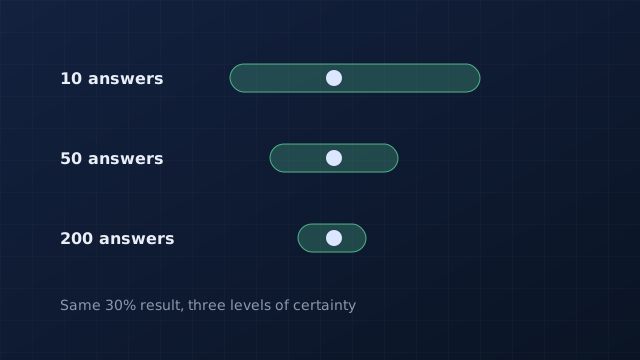
A rate from a few answers is a rough estimate, not a fact. With 10 answers and 3 mentions, the observed 30% could easily be anywhere from about 11% to 60%. The Wilson score interval shows that range. It stays inside 0% to 100% and behaves well with the small counts a new audit starts with, which the simpler normal approximation does not.
| Completed answers | Mentions | 95% range | Width | Confidence label we use |
|---|---|---|---|---|
| 10 | 3 | 11% to 60% | 49 points | Very low |
| 20 | 6 | 15% to 52% | 37 points | Low |
| 30 | 9 | 17% to 48% | 31 points | Low |
| 50 | 15 | 19% to 44% | 25 points | Moderate |
| 100 | 30 | 22% to 40% | 18 points | Good |
| 200 | 60 | 24% to 37% | 13 points | Good |
| 400 | 120 | 26% to 35% | 9 points | Good |
The same arithmetic tells you how many answers a target precision costs. At a rate around 30%, plan on roughly 80 answers to know it within about 10 percentage points either way, and about 320 for 5 points. At a rate near 10% the figures are about 35 and 140, and near 50% about 95 and 380. Zero is not proof of absence either: 0 mentions in 10 answers still leaves a range up to 28%.
- 12 questions on 3 assistants once a week is 36 answers a week, so the sample reaches 100 in about three weeks.
- Keep the confidence labels honest in reports: Very low under 10 answers, Low under 30, Moderate under 100, Good from 100 up. These cut-offs are our own convention, not an industry standard.
- The range assumes independent answers. Repeating one question is not fully independent, so treat the range as a minimum amount of uncertainty.
Step 4: Judge a change by the ranges, not the headline
After you improve a page, you will want to know whether it worked. Compare the ranges before and after. If they are clearly apart, the change is probably real. If they overlap, you need more answers before claiming a result.
- Is the question set identical before and after? If not, stop: the comparison is invalid.
- Did the model version or search setting change in between? If yes, note it and treat the result with caution.
- Do the two 95% ranges overlap? If yes, keep collecting answers.
- If they are apart, report the change with both ranges, the dates, and what you changed.
- Say "was followed by" rather than "caused". Other things change between audits too.
Set a baseline and a rhythm
Run the full question set for four weeks before you change anything, so you have a baseline with a usable range. Then keep the same weekly rhythm. For Google's own features, add a first-party cross-check: Search Console's Generative AI performance report shows how many times your pages appeared in AI Overviews and AI Mode, by page, country and device. It reports impressions, not what the answers said, so it complements the audit and does not replace it. Google AI Overviews and AI Mode: how to control them and report on them explains how to read it. Write down every change you make, with its date, next to the results. When you start fixing pages, the methods in how to get cited in AI answers give you the changes to test.
Common mistakes
| Mistake | Why it misleads | Do instead |
|---|---|---|
| Judging from one answer | Answers change from run to run | Count many answers and show the range |
| Changing the questions between audits | You are no longer measuring the same thing | Version the question set |
| Counting failed runs as "not mentioned" | Lowers the rate for reasons unrelated to your business | Exclude them from the denominator |
| Mixing mentions and links | A name with no link is a different result from a cited page | Report both, separately |
| Mixing chat screens and APIs | They can behave differently | Keep one source per rate |
| Claiming a fix caused the rise | Models and competitors also change | Report the timing, and the ranges, and stop there |
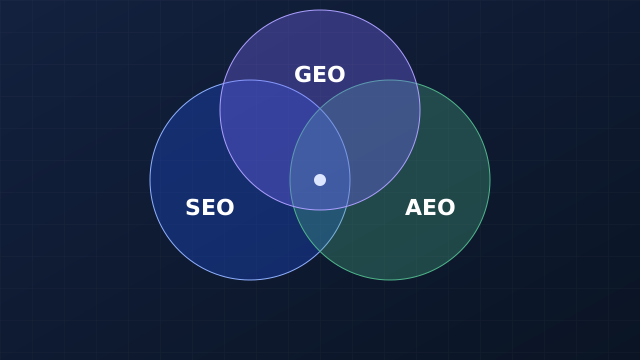
To see how this fits the rest of your search work, read SEO vs AEO vs GEO: the measurements here are the AEO and GEO layer of that framework.
- Write 12 customer questions across the four types and save them as version 1.
- List the assistants your customers use and the competitors you will track.
- Create one row per answer using the fields in step 2.
- Run every question once now, then weekly for four weeks.
- After four weeks, calculate the four measurements with their ranges. That is your baseline.
Quick answers
How many questions do I need for an AI visibility audit?
We recommend 10 to 20 real customer questions across discovery, comparison, problem-solving and brand-specific types. Fewer makes coverage meaningless, and more only helps if you can run them all often enough.
How many answers do I need before the numbers mean anything?
At a rate near 30%, about 80 answers pin it down to roughly 10 percentage points either way, and about 320 to 5 points. Below 30 answers treat any rate as directional.
What is a good AI mention rate?
We found no verified industry benchmark, and published targets come mostly from vendors. Compare your rate with your own baseline and with competitors on the same questions instead.
Which AI assistants should I test?
The ones your customers actually use. Test each on the same fixed questions and report each separately, because the assistants retrieve and cite sources differently.
Sources and methodology
- Binomial proportion confidence interval (Wikipedia), for the Wilson score formula and why it suits small samples.
- Search Engine Journal: AI recommendations change with nearly every query (SparkToro), our source for the repeated-prompt study. We read the report, not the original study, and the study did not settle how many runs are enough.
- Google Search Central: AI features and your website, for how Google's AI features count in Search Console.
- Search Console Help: Generative AI performance report (Search), for the impressions Google reports for AI Overviews and AI Mode.
Methodology. The method, the four measurements and the confidence labels are our own framework, not an industry standard. The ranges in the tables and figures were calculated for this guide with the Wilson score formula at 95% confidence (z = 1.96); you can reproduce any of them from the counts shown. Sample-size figures are rounded and assume independent answers. The plumber examples and the before-and-after counts are invented for illustration. Sources were read on 7 November 2026.
Reviewed .